Acknowledge and close an existing reception request deliberately
Establish the request's office context
A reception request can need a human response even after someone plans a follow-up. This guide follows that request through acknowledgement and queue closure. A future Calendar draft is a separate outcome; it does not establish who is responding now.
Use an organization owner or admin account with management access to the intended workspace. From organization management, open AI Contact Center. Confirm Organization, then choose AI reception and find the Workspace selector under Reception Test. Select the intended office before opening Handoffs. You do not need to send a test message or change receptionist settings.
The workspace selection carries into Handoffs, but its cards do not display the workspace name. Stop if you cannot establish the intended scope. A failed workspace change can leave an earlier office's cards visible. An empty-looking list beside an error is also not evidence that every request has been handled.
Identify the existing request without inventing history
Read the purpose, message and date together. The date is the request's creation time, formatted for the browser's local context; it is not the time somebody answered or finished the work. Similar requests can have similar wording. If the visible details cannot distinguish them, resolve that ambiguity before changing a card.
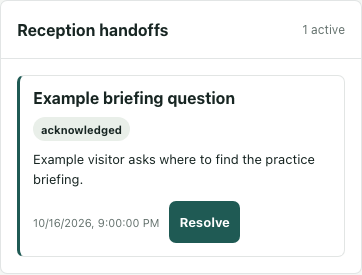
The fictional example is Example briefing question: a visitor asks where to find the practice briefing. Its locally rendered original interface shows an acknowledged request. No real request was taken, visitor contacted or reception work completed for this example.
These cards do not show a request identifier, assigned person's name or assignment history. Do not turn the displayed status into a story about who handled the request or which conversation occurred.
Agree who will actually respond
Before taking over, agree who will answer, what information they need and how they will confirm the response through an available channel. Keep that human agreement separate from the interface state.
Acknowledged means the request has been marked as taken; it does not establish that a visitor received an answer. The operation also does not guarantee an exclusive first claim. Two people should not assume that clicking first prevents the other from taking responsibility. Coordinate directly rather than racing the controls.
Take once and read the returned state
In organization Handoffs, an open card offers Take. Wait for the returned acknowledged status and inspect any error. A click is not acknowledgement; a rejection can leave the earlier status displayed.
Ordinary eligible workspace staff have a separate Take request action in Inbox & desk. That action does not give them organization-level completion controls. It has no pending-button protection, so avoid repeated clicks while waiting. After a successful summary refresh, the open notification can disappear while the request remains acknowledged. Disappearance is not resolution; a failed refresh can instead leave the old card beside an error.
Close the queue record after the agreed work
Confirm the human response independently before using Resolve in the authorized organization view. Resolve is also available on an open card, so its presence does not prove that acknowledgement or contact already happened.
Wait for the returned resolved status and read errors before treating the queue record as closed. The card remains, while its action buttons disappear. This is a recorded status change, not proof of a completed call, delivered answer or visitor satisfaction.
Resolving records the resolving operator as the current responsible account, potentially replacing the earlier taker. It does not preserve that earlier assignment as a visible history. Keep any necessary account of who responded in your team's existing record. Finish with the observed request state, the separately confirmed response and any unresolved scope or loading problem.