Check Visitor Capacity Before Opening an Office in Kiguri
Start with the office you will host
Before inviting visitors to a shared office, establish which workspace will receive them and who can check its management context. A figure from another office can mislead your visit plan. Ask an owner or administrator of that workspace to make the check; having an account or belonging to an organization is not the same as managing every office.
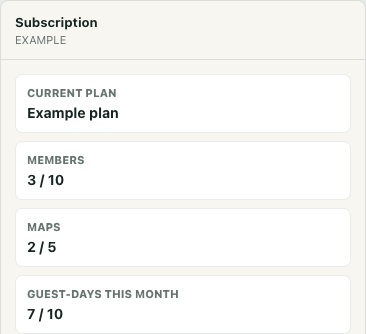
In Operations, find the intended office in My spaces and use its Manage control. Confirm the office name rather than relying on whichever workspace was selected previously. Let its information load, then find Subscription. The local interface example uses a fictional office, Example plan and supplied counts, including 7/10 guest-days; these are not actual Kiguri plan allowances or evidence of real visitors.
Read the right unit before estimating
Subscription presents separate cards for Current plan, Members, Maps and Guest-days this month. Members and Maps describe different usage and limits. They do not tell you how many visitors are online, and the guest-day card does not show people currently in the office.
Guest-days are also different from the number of distinct people who visited during the month. For the same workspace and person, a visit within less than 24 hours of the existing window's start does not create another guest-day. Revisiting during that window does not extend its starting point. A later visit outside that window can count again, so one person may contribute more than one guest-day over time.
Monthly usage attributes a guest-day to the UTC calendar month in which its window starts. Crossing midnight, including the start of another month, does not by itself require a new count while that person's existing window still applies. Use this distinction when discussing repeat visits instead of assuming that every calendar day or every entry consumes another unit.
Turn the figures into a cautious visit plan
Read the displayed used amount against the included amount for the intended office. In the fictional 7/10 example, the arithmetic difference is 3 guest-days. That does not promise admission for three additional people, reserve capacity or describe three empty places in the room. Usage can change after you look, and each visitor still needs an eligible access route.
An already-counted visitor whose current window remains valid can pass the capacity check even when the monthly allowance is exhausted. That does not bypass other access requirements, such as visitor eligibility or required consent. Equally, an apparent remaining allowance does not settle those requirements. Coordinate the destination, timing and expected repeat visitors with the responsible host rather than announcing guaranteed entry from subtraction alone.
Treat missing or failed reads as unresolved
A dash for guest-days is unavailable information, not zero usage. If loading fails, do not assume every visible number belongs to the newly selected office. After switching between managed offices, a failed billing read can leave the previous office's guest-day figures beside the new office's member count.
Read any warning and verify which management context you opened. A generic Refresh is not a guarantee of a fresh billing read. Reopen the intended management context and wait for a valid load, or ask the responsible operator to establish the current figures. Until that uncertainty is resolved, avoid using the displayed remainder as the basis for new invitations.
Agree on the fallback before visitors arrive
If capacity is uncertain or the expected visits may exceed it, coordinate an alternative with the administrator before opening the session. That might mean adjusting the visit schedule or agreeing on another meeting route. Keep guests informed about the confirmed destination and whom to contact if entry fails.
Finally, confirm that visitors actually reach the intended office. A host's usage check supports planning; it does not prove admission or arrival. Keep that check separate so a plausible counter is not mistaken for a completed visit.