Choose a personal desk and separate preview from saving
Personal desk assignment is different from sitting on a chair or editing the office map. Where member tools are available in your workspace, My desk lets you inspect available desks and manage your own assignment. Check the current state before acting: a desk appearing in the selection list is not yet your assigned desk.
Open the member desk controls
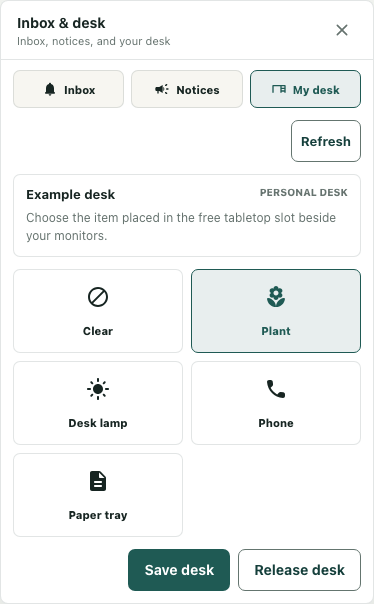
Open Inbox & desk and choose My desk. A supported computer interaction can also open this tab. These are member tools; exploring the public playable demo does not establish access to an organization's desk settings. If the panel is unavailable, check the workspace and your permitted member access rather than trying to claim a desk through a decorative computer image.
The panel may show Loading desk, Desk information unavailable, or an error. Those states do not establish whether a desk is available. Use Refresh to inspect the returned state and keep any visible error separate from an empty availability list.
Distinguish availability from assignment
When you have no assigned desk and options are available, Choose your desk provides an Available desk selection and Use this desk. Selecting an option alone does not claim it. Confirm the intended desk before using the assignment action, then inspect the resulting panel instead of treating the click as success.
No unassigned desks are available means this view has no option to offer. It does not mean every desk illustration is unavailable for sitting. An assignment can also fail if another member claims the same desk; the service checks ownership rather than relying only on the earlier list. Refresh and read the current result when a conflict occurs.
Make a deliberate decoration choice
An assigned desk shows its name and Personal desk controls. Choices include Clear, Plant, Desk lamp, Phone, and Paper tray. Choosing one changes the current decoration selection and invokes a local preview. It is not the Save desk operation.
For example, choose Plant and inspect the selected control before deciding whether to keep it. Check the preview in your own workspace before deciding whether to keep the choice. The guide image uses a synthetic example and does not establish that your settings were saved. Keep decoration choice separate from editing desk furniture or calibrating a chair's seated pose.
Save or release with the state visible
Use Save desk when you want to submit the decoration choice. Wait for the operation to finish and inspect any error. Refresh can retrieve the desk's returned settings; an unchanged selected button alone is not evidence that persistence succeeded.
Release desk asks for confirmation and relinquishes the assignment. The service also resets the released desk's decoration to Clear. Check the resulting unassigned or availability state afterward. These controls describe the implemented workflow, while the actual inventory and successful persistence in your workspace must be confirmed through its current response.