Configure a presentation object to open the intended resource
Choose a functional resource object
A presentation podium or stream screen can offer a link to material in the browser. Naming an object Stream screen does not create an embedded player, share your desktop or broadcast media to an audience. Use this workflow when the intended result is opening a resource such as workshop slides.
In a workspace you can edit, use Podium or Stream screen under Functional objects and work with an editor-added object. Select its intended functional piece before changing the properties. A decorative monitor or the wrong active piece will not provide the same behavior. These event objects follow the Events layer lock, even though their placement controls appear among functional objects.
Write a label that matches the destination
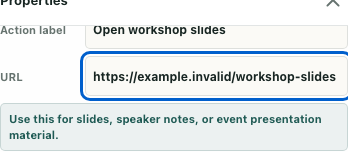
In the selected properties, enter a clear Action label and an absolute HTTP or HTTPS URL. The fictional example uses Open workshop slides with https://example.invalid/workshop-slides. That address is deliberately an example, not a working presentation to visit.
The native fields limit the label to 80 characters and the trimmed URL to 500. Inspect the complete address rather than only its visible end: a narrow input can scroll horizontally. The mobile figure shows the full example in an isolated property region, while the desktop field can expose only its tail.
Keep the label accurate about what a visitor should expect. Open workshop slides is more useful than a promise that a presentation has already started. Neither the label nor a URL pasted into the field establishes access to the remote document.
Validate and inspect the stored configuration
Use the existing validation workflow to inspect missing or invalid event-object URL warnings. The URL check accepts an absolute HTTP(S) address; it does not fetch the destination or check its permissions. A structurally acceptable URL can still point to unavailable or unintended content.
Export the layout through the ordinary editor workflow and identify the intended custom object. Check actionLabel and actionUrl together with its identifier and kind. Custom-object serialization carries these fields; base-object position transforms do not provide the same metadata record. Do not generalize an edit to every screen already supplied by a base map.
Confirm an actual map save separately after accepting the configuration. The guide's native field and export checks used inert selected-object and layout adapters. Exact source-method checks verified serialization into a memory sink, not server persistence or a later visit.
Interpret the interaction result correctly
During ordinary permitted use, interact with the intended functional object. An empty podium URL produces Add a presentation URL in editor; an empty stream-screen URL has its corresponding stream hint. Return to the identified object's configuration rather than changing an unrelated nearby display.
A nonempty invalid address follows a different path. The browser-opening helper refuses unsupported schemes or malformed URLs, but the object's interaction ignores that refusal result. You may therefore see no missing-URL hint and still have no opened resource. The absence of that hint is not a success receipt.
The runtime helper can resolve relative addresses against the office origin, while editor validation requires an absolute address. Use the intended full address rather than relying on that difference. A window-opening request can also return without a visible tab; the helper does not confirm the resulting window or content.
Finish with the outcome you observed
Keep the object identifier, label, address, validation finding, exported-field check and actual save result in one short note. If a resource is opened through authorized use, inspect its destination and accessibility separately. A popup request is not proof of playback or delivery to other attendees.
The native image shows synthetic properties only. The isolated checks never opened an external page, entered a real game world or saved a map. Finish with a verified configuration and explicitly unresolved browser or content outcomes, rather than calling a configured link a completed broadcast.