Keep local checkpoints before a major map change
A named checkpoint is useful before a change you may want to compare or undo as a whole. It stores a layout snapshot for the current map. It is separate from server saving and should not be your only backup.
Name the decision point
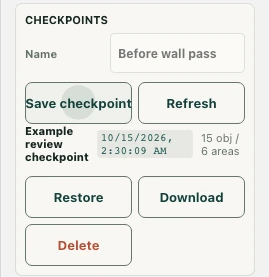
In Advanced editor → Checkpoints, enter a meaningful Name and select Save checkpoint. “Before wall pass” is more useful than an unexplained number. The list shows a timestamp and object/area summary so you can distinguish stages of the same map.
Take the checkpoint before the experiment. For example, preserve the layout before converting a desk row into a lounge, not after you have already removed the original furniture.
Understand where it is kept
The checkpoint list uses browser storage. If that storage limit is reached, the editor warns that checkpoints are kept in memory only. Do not assume every checkpoint is synchronized to another device or is permanently retained after browser data is cleared.
Use Download for a separate JSON file and verify that the file was actually downloaded. That file and a successful server save serve different recovery needs.
Restore only after preserving current work
Restore warns that current unsaved edits will be replaced. If you need those edits too, create another checkpoint or download/export them first. After confirming, the editor imports the checkpoint layout, marks it as changed, and reloads the map to apply it.
Inspect furniture, areas, walls, and floor changes after the reload. Restoration is not itself a server-save confirmation.
Accept or reject the restored draft
Compare the restored layout with your intended design. Save changes only if you want that version on the server, and verify success. Use Refresh to reload the current map’s checkpoint list, not to recover an assumed remote archive. Delete a checkpoint only when you no longer need that local recovery point.