Use layer controls to protect the part of a map you are keeping
In a crowded map, it is easy to select or change the wrong kind of content. Layer controls help separate the task you are doing from the parts you intend to preserve. Active layer, visibility, and locking serve different purposes.
Choose the layer for the task
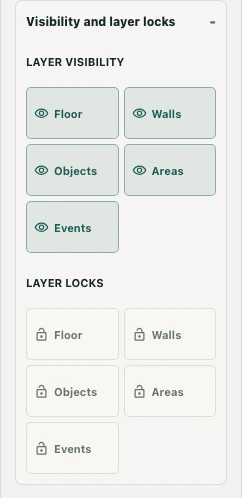
Layer workspace includes Floor, Walls, Objects, Areas, and Events. Select the layer relevant to the change. For example, a furniture rearrangement belongs to Objects; it is different from changing a floor finish or redefining an area.
Choosing the right layer helps you find the relevant tools, but does not by itself prove that every other layer is protected from editing.
Use visibility to inspect the layout
Layer visibility provides separate show/hide controls. Temporarily hide distracting content to inspect what is underneath, then restore it before judging the whole map. A hidden layer is not deleted, and visibility is not an access rule for office participants.
For a wall correction behind furniture, reduce the visual clutter first. Recheck the furniture afterward so the finished assembly still makes sense.
Lock content you do not intend to change
Layer locks separately controls Floor, Walls, Objects, Areas, and Events. A locked layer can reject an edit and produce a notice. Use locks when you want to protect a completed part of the draft while working elsewhere.
Do not interpret a lock as a workspace permission change. It is an editing control, not a way to grant access or make an area private. Some compound operations, such as generation, can also be disabled when relevant layers are locked.
Restore the full view before saving
Review which layers are visible and locked, then inspect the complete map. Check that the operation affected the intended layer and did not leave a hidden problem unnoticed. Test routes and interactions outside the editor where appropriate. Save changes only after accepting the layout, and confirm the server result rather than treating a clean isolated view as proof that the whole map is finished.