Find a department floor in a configured elevator
Start with an available configured elevator
A colleague gives you a department name rather than a destination map. In a building with a configured elevator, its floor menu can help you connect that name to a floor choice. Use the actual office interaction to open the available menu; a decorative elevator image alone does not establish that this flow is supported.
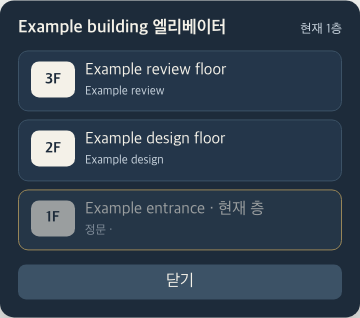
The worked example is fictional: Example building has an entrance on floor one, Example design on floor two and Example review on floor three. The image shows the actual menu with synthetic directory data and native Korean labels. Local callbacks and source checks were used; no actual floor journey, access approval or department visit occurred.
Read the building, floor and department together
The heading combines the building name with 엘리베이터, meaning elevator. The current-floor label identifies the present floor. Compare that context with each row's floor number, label and department text before choosing a destination. A department name in a fictional illustration is not evidence that your office has the same directory.
The current floor is disabled and marked as current. In the example, 1F cannot be selected again, while 2F and 3F offer other choices. This disabled state is expected; repeated presses do not request another arrival on the current floor.
Floor one uses the 정문 entrance cue, even when its department list is empty. For other floors, an empty department list uses 부서 없음, meaning no department. That distinction prevents an entrance row from being misread as a missing department assignment. Configured floor entries are filtered to the supported bounds and require a target map, then appear in descending floor order. The menu is not a list of every possible floor or a permission directory.
Choose a floor and interpret the immediate result
Select the row whose label and departments match your intended destination. In the isolated example, choosing 2F calls an inert floor-request handler. When that handler returns true, the component hides the menu and requests office-canvas focus. This checks the local action sequence, not completed movement.
The actual game method checks the active elevator configuration, selected target and pending transition state. A current-floor, unknown-floor, same-map or already-pending selection can return false without starting another request. A missing or inactive portal, or missing elevator configuration, follows a different rejection path that calls the menu-closing method before returning false. Do not summarize every rejection as leaving the menu open.
For a valid target, the source establishes a pending transition and requests portal activation. Returning true means that request was initiated. It does not prove the network delivered it, access was accepted, or the character reached a safe destination.
Confirm arrival or leave the menu deliberately
After ordinary use, inspect the resulting map and surroundings before telling a colleague you reached their department. If the destination remains uncertain, record the building, previous floor, requested row and actual outcome. Menu disappearance alone cannot resolve that uncertainty.
To leave without choosing a floor, use 닫기, meaning close. That button calls the game closing method, clears the menu's local state and requests canvas focus. Escape calls the game closing method and relies on its elevator-close event to clear the menu; it does not include the same explicit focus request. The two paths should not be treated as identical.
The finish is a department-based choice with its actual outcome checked, or a clearly unresolved transition report. Keep membership, media connection and successful arrival separate from the directory labels and the local selection result.