Find an existing contact without starting a call
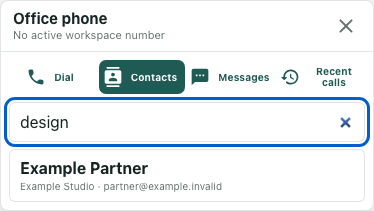
The Office phone window includes a Contacts tab for looking through directory entries available to the current account. Contact access depends on a workspace linked to an organization and active organization membership. A playable demo or a visible phone-shaped object does not establish that access. The pictured entries are invented local examples, with no active workspace number or call.
Open the available directory view
Use Open phone where that control is available, then choose Contacts. Let the window finish loading before interpreting the result. The tool loads contact records along with phone information; directory visibility and enabled calling are separate conditions.
Read the displayed name and company or contact details carefully. Similar names may describe different records. The accessible collection is organization-scoped and limited by the current response, not proof that the panel contains every customer or every contact in every workspace. Only active records are requested, and the server limits the list to two hundred and fifty entries.
Search within the loaded records
When entries are available, use Search contacts. The field filters the loaded records using name, company, email, phone, and tags. It does not independently retrieve an unlimited directory as you type. Start with a term that helps identify the intended record, then compare its details with your actual need.
In the fictional example, typing design matches Example Partner through its tag even though the name itself does not contain that word. The visible email uses example.invalid. A tag match can help locate a candidate, but it does not verify that the record is the right recipient or that its contact details are current.
Distinguish no-match from no loaded contacts
No contacts match this search means the current filter found nothing in a loaded collection. Clear or change the term and inspect the remaining records before assuming that a contact was deleted. A spelling difference, missing tag, archived record, or entry beyond the loaded subset may need another check.
No contacts yet is a different screen, but it is not conclusive evidence that the organization has no records. The current interface also turns a failed contact load into an empty list. An access error can therefore produce that same message. If you expected a directory, confirm the selected workspace's organization and the account's membership with its owner or administrator. Avoid adding a duplicate merely to make the empty screen disappear.
Stop at identification when you do not need a call
A contact entry is disabled when calling is not enabled or the record has no phone value. You can still read and search the displayed information. Do not treat the disabled entry as proof that the directory record itself is unusable.
With calling enabled and a phone value present, selecting an entry prepares its number in the Dial tab; it is not evidence of a completed call. For a directory lookup, leave the entry and dialing controls untouched. Finish by identifying the relevant record in the available subset, or by recording the unresolved search or access condition that needs an authorized check.