Hand conference host control to another participant
Agree who is taking over
A conference host may need to leave while the discussion continues. In this fictional practice example, Example outgoing host wants Example successor to take moderation. Both should agree on the remaining responsibility before using the control: who watches participants, who handles interruptions, and who closes the discussion. That agreement is a human step.
Kiguri’s Make host action transfers conference control. It does not add a parallel cohost: the accepted operation makes the selected participant host and changes every other participant’s conference role to participant. Be ready to give up your own host controls. This does not promote anyone to workspace administrator or change workspace membership.
Find the intended participant
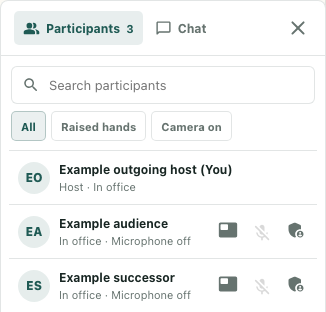
In the meeting controls, open Participants. Check the participant’s name and the meeting you are in before choosing a row. Search and the All, Raised hands, and Camera on filters can change which rows appear; return to All and clear an unwanted search if the intended person is missing. Similar display names deserve an explicit identity check with the person.
The current conference host sees a Make participant host control for other rows. Its label includes that participant’s name; the compact interface uses an icon. The action sends immediately rather than opening a confirmation step. Being a workspace owner is not, by itself, evidence that your current conference role has these controls.
An audience participant cannot become host through this operation. The interface can still show the action on their row, so a visible button is not proof of eligibility. Microphone off also does not identify an audience role. Agree on an eligible participant already in the same conference instead of treating a rejection as a device problem.
Send once and check the response
For the fictional successor, choose Make Example successor host only after checking the row. A click is a request, not completion. The current adapters do not replace the roster roles merely because a command is acknowledged; the interface needs returned conference state. With no control connection, the command handler can return without sending anything.
Read any conference action notice in the context of the request you just made. Audience cannot become host, Participant not found, and Host access required indicate different problems. Stop and resolve the target, current role, or connection uncertainty before repeating the operation. Do not keep clicking different names to discover who works.
Verify both sides of the handoff
After returned state changes, the outgoing host should lose the host-only moderation controls. The successor should check that those controls are available in their own Participants panel and acknowledge the agreed responsibility. Where the roster status is unobscured, it shows Host · In office. Speaking or Presenting can take precedence over that text, so a missing Host label alone does not establish a failed transfer.
Keep a short handoff note containing the meeting, intended successor, any error, and what each side actually observed. A transfer does not switch microphones or cameras, lower raised hands, or establish that anyone can hear the discussion. Those are separate checks. Returning control requires another transfer by the current host; the outgoing host cannot independently reclaim it. Later joins or departures can also affect host selection, so record the current observation rather than promising permanent control.
The interface image uses fictional peers and supplied state in an isolated native component. No real conference, host transfer, device, or media delivery was exercised.