Adjust office lighting without changing the shared map
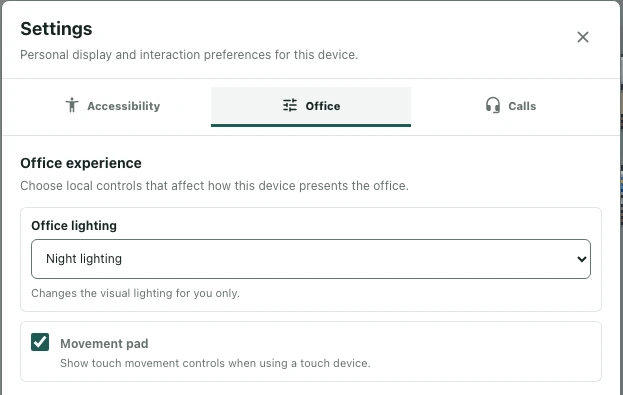
You may want a different visual mood without changing the office for everyone. Office lighting is a personal display preference. It is different from editing floors, walls, or furniture and does not require a new layout to be saved.
Find the local display preference
Inside the office, open Settings and select Office. Under Office experience, find Office lighting. Its description explains that it changes visual lighting for you only. This is the relevant control when you want to adjust your own view rather than redesign the shared space.
Check that you are using the office settings, not the editor’s floor or wall tools. Those tools change different things and can require workspace editing permission.
Compare Day and Night lighting
Choose Day lighting or Night lighting and look at the same part of the office. Compare the result around text labels, furniture edges, and passages, not just an empty floor. A view you prefer aesthetically should still make the next movement or interaction clear.
If you are checking a layout with a colleague, identify which lighting preference each of you is using before comparing screenshots. Different local views do not necessarily mean the shared map is different.
Keep lighting separate from access and media
Changing lighting does not unlock a room, enable a portal, or connect microphone and camera. It also does not place new lamps or modify an object’s behavior. Use the relevant access, media, or editor controls for those tasks.
Return to the setting when troubleshooting
If the office looks unexpectedly different, revisit Office lighting before assuming assets have changed. Compare a stable location under the two available choices. Do not assume this local preference automatically synchronizes across all devices or accounts. When reporting a visual issue, include the lighting choice, device, and location so another person can reproduce the same view.