Read recent call metadata without opening notes

Start with a small question
A team member wants to know which displayed entry corresponds to an attempted office call. Open Office phone and choose Recent calls. Keep the question narrow: identifying an entry from its visible metadata requires less interpretation than explaining what happened during the conversation. The worked example here is fictional, using isolated local UI data rather than anyone's call history.
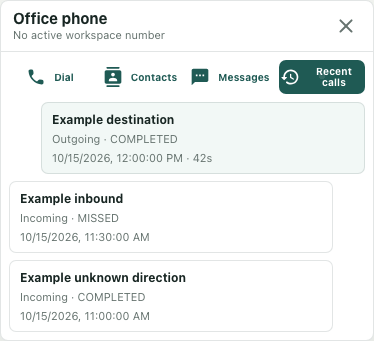
Our example list contains an outgoing COMPLETED entry, an incoming MISSED entry and an entry with no direction metadata. None has call notes. The accompanying image shows the actual Recent calls controls with those synthetic entries; no real record was fetched and no call was placed.
Read direction and number together
For an entry marked Outgoing, the interface shows the called number. Incoming entries show the caller number. Read that number together with the direction and status, rather than identifying an entry from a familiar-looking number alone. A number can occur in more than one attempt.
There is a consequential display fallback: the interface labels an entry Outgoing only when its direction metadata is exactly outbound. Other values, including missing direction, render as Incoming. In the fictional third entry, Incoming therefore describes the interface's choice, while the underlying direction remains unresolved. Record that uncertainty if direction matters to your follow-up. The label alone cannot settle it.
Likewise, COMPLETED is a displayed status. It does not establish who spoke, whether a person understood a message, or whether the intended work was finished. Those are different questions requiring other evidence.
Interpret time and duration separately
The date and time shown belong to the entry's start timestamp. They are not its completion time. Formatting follows the browser's locale and timezone, so two colleagues comparing screenshots should first establish which local time each screenshot uses. The fixture image uses a fixed UTC browser context; ordinary displays may differ.
The fictional outgoing entry includes 42s. Its positive duration is visible alongside the start time. The MISSED entry has a zero duration in the example data, which is omitted from the interface; the third entry has no duration and also shows none. An absent duration label therefore cannot distinguish zero from missing information. Preserve that distinction in a written check rather than replacing every blank with zero.
Check what the list leaves uncertain
The service returns a bounded recent list ordered by start time, with a maximum of thirty entries. An older attempt may be outside that subset. A successful empty view says No calls yet. A failed initial load with no available summary instead shows Phone service could not be loaded in place of the normal history content. Keep that error state distinct from a successful empty list, and avoid treating a failed load as evidence that no calls exist.
Finish with a compact observation: displayed number, direction label, status, start time with timezone context, and duration if shown. Mark unknown direction or absent duration explicitly. Leave note-opening and dialing actions separate from this metadata check. This workflow helps you formulate a precise follow-up without turning a display fallback or a missing field into a stronger claim.