Read team busy periods before proposing a meeting time
A green availability label can describe the current instant while a proposed meeting overlaps a later busy period. Use Team availability to prepare a time to discuss, with the limits of the displayed information recorded. This is a planning check, not an automatic booking or confirmation that colleagues can attend.
Open the intended workspace and read the context
Open Calendar through the available office controls and select Team availability. Confirm the intended workspace account context. If the tool reports that it needs a signed-in workspace or shows a loading error, resolve that before interpreting a blank list. A failed read is different from a successfully loaded No active team members result.
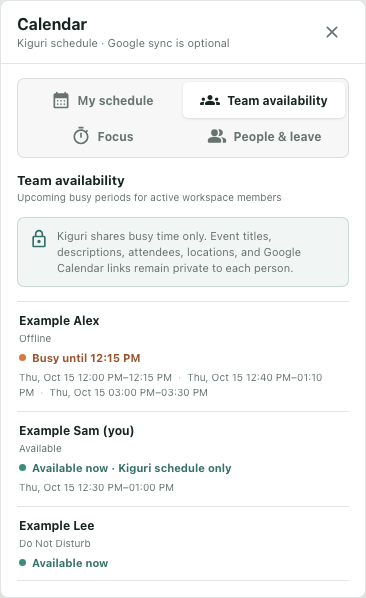
The interface example uses three fictional members and synthetic calendar data in an isolated component. No real member records, external calendars, invitations or meetings were accessed. All example times are UTC; the interface formats dates and times using the browser's local settings.
Read presence and busy time separately
Example Alex is Offline but has a busy span ending at 12:15. Example Sam is marked Available and shows Available now · Kiguri schedule only, with a later 12:30–13:00 period. Example Lee has Do Not Disturb presence while the calendar column says Available now.
These combinations are not necessarily contradictions. Presence and stored calendar intervals answer different questions. An offline label does not erase a busy period, and a calendar gap does not establish willingness to be interrupted. Keep the person's communication preference separate from the interval you are evaluating.
The Kiguri schedule only qualifier matters: the qualifier means no calendar connection record was found for that member; stored busy periods can still be present. Conversely, the absence of that qualifier is not proof of fresh synchronization. The underlying connection indicator follows the existence of a connection record, including one whose last sync is missing or old.
Compare the whole proposed interval
Suppose the group is considering 12:20–12:35. Alex's current busy span has ended by the proposed start, but Sam's displayed 12:30–13:00 interval overlaps the last five minutes. Sam being Available now is insufficient grounds to accept that proposal. Revise the candidate or clarify the relevant constraint before creating anything.
Read the dates as well as the clock times. Busy spans can combine overlapping or adjacent stored events and are clipped to the requested window. They do not identify a particular event or explain why someone is busy. The team view shares interval information rather than event titles, descriptions, attendees, locations or Google Calendar links.
Check every required participant's displayed periods against the complete proposed duration. Preserve anyone whose coverage or participation remains uncertain instead of treating an unlisted person as available.
Keep the display limits in the scheduling decision
The response covers a bounded window, normally seven elapsed days. The interface displays at most three not-yet-ended periods per member, and an active period can occupy one of those three. This is not a complete listing of every future commitment.
A label can also change when the interface re-evaluates an already loaded span at its end. In the isolated check, switching views at 12:15 changes Alex's label without fetching new availability. That is not a fresh provider synchronization or evidence that another event was not added elsewhere.
Reopen through the ordinary tool flow when you need a new read, inspect any error, and compare the intended interval again. Then use the team's agreed scheduling process to confirm the proposal with the required people. Finish with a candidate time, its checked coverage and remaining questions; calendar color alone does not establish consent, a saved schedule or delivered invitations.