Read your account privacy request history without guessing the outcome
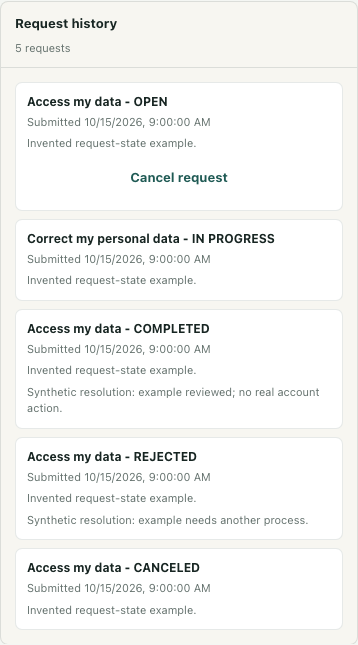
Account & privacy includes a history of requests associated with your signed-in account. Use it to inspect a recorded request and its explanation before assuming that an account change has happened. The illustrated history contains invented local records; no export, request, cancellation, or account change was performed to create it.
Open your own account view
Open the workspace and account management view, then select Account & privacy. This is an account section, separate from a workspace's member-management controls. Sign-in is required for the account routes; being a workspace owner is not the basis for seeing another person's history.
Find Request history below the data and request forms. The service loads records for the current account, ordered by submission time. If the panel shows an error, do not treat the visible result as a successful refresh. If you need a new reading, leave the account tab and return so the panel loads again. An empty successful result and a failed load are different observations.
Match the type and submission context
Read the request type before interpreting its state. Access my data, Correct my personal data, and Delete my account and personal data describe different requests. A completed access request does not establish that an erasure request was completed too.
Compare the Submitted date and any Details with the request you intended to inspect. The date displayed in the row describes submission, not necessarily the date an action finished. When several records concern similar topics, use the type and description together rather than selecting whichever row has the most reassuring label.
Read the state alongside the explanation
OPEN and IN PROGRESS identify records that have not reached a final processing state. COMPLETED, REJECTED, and CANCELED are distinct final states. Read any resolution beneath the row; it provides context that the status alone cannot communicate. The example shows these states side by side to explain the interface, not to demonstrate five real requests.
Only an OPEN row offers Cancel request in this panel. Its presence is a separate action control, not a refresh button or evidence that the request has been canceled. Keep it untouched when your purpose is simply to inspect the record.
A COMPLETED erasure record should not be read as proof that every associated message, shared record, or copy has disappeared. The implemented erasure processing changes selected account and linked visitor records; the history label does not audit the entire result. Other request types also need their recorded explanation rather than an assumed account-wide effect.
Keep history separate from an export
Export my data is a separate operation that prepares a downloadable account-context file. Request history itself does not download that file or establish its completeness. Account-related communications and linked metadata can be sensitive, so do not share an export merely to demonstrate a request status.
If the type, state, or explanation does not establish the outcome you need, use the contact route shown in the account section to ask about that specific record. Preserve the uncertainty instead of submitting another request solely because the first label is unclear. The finish check is an identified request with an understood state and explanation, or a precise question that still needs an answer.