Recover a missing copy source in the editor
Paste can stop working even when an object still exists. It can also use a source that changed after Copy, or continue from a newly pasted object. Follow the copied source's lifetime before treating either result as a broken clipboard. The example here uses fictional objects and isolated native editor controls; it does not demonstrate actual sprite rendering, map saving or operating-system clipboard access.
Identify what Copy actually keeps
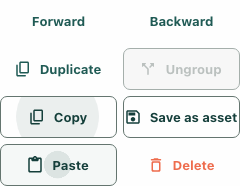
Select an eligible movable object and use Copy. Wall decoration is excluded from this control. Copy keeps the selected object's identifier in the current editor state, along with a label for feedback. It does not freeze the object into a snapshot or place its contents on the operating-system clipboard.
In the fictional case, the intended source is desk A. After copying A, selecting desk B does not change the stored copied identifier. Paste still requests duplication of A. If you actually intend to copy B, use Copy again while B is selected rather than assuming that selection alone updates the source.
Inspect the source before the first Paste
Because the copied identifier refers to the live object, changes to that source before Paste matter. In the isolated example, A is moved after Copy. Paste passes A's identifier to the duplication method, which resolves its current group instead of an earlier frozen version. The method uses that group's current pieces.
Check the intended source and relevant layer before pasting. Do not treat the earlier Copied feedback as a guarantee that the source still exists, remains editable or has its previous arrangement. The bounded checks use inert object and sprite-factory adapters; they do not prove that every visual or functional property is cloned correctly in a running game.
Follow the newest copy through repeated pastes
A successful Paste requests offsets of forty-eight in both horizontal and vertical coordinates. It then replaces the stored copied identifier with the newly returned object's identifier. Another Paste therefore continues from that copy, rather than always returning to the original desk.
In the fictional trace, A produces copy A1. If A1 is then moved, the next Paste uses A1's current position. If it remains unchanged, the next request adds another forty-eight in each direction. The feedback label can still refer to the original copied label, so do not use that wording alone to identify the current source. Inspect the selected result and intended placement after each paste.
Read the missing-source warning as an unresolved cause
When duplication returns no new identifier, the editor reports Copied object no longer exists. It also clears its stored copied identifier, leaving Paste disabled. Open the advanced editor tools when you need to inspect this action feedback.
The current duplication method returns no identifier both when the source group is absent and when its layer is locked. The same warning therefore cannot establish deletion by itself. Check whether the intended source still exists and whether its relevant layer lock prevents the operation. Unlocking an appropriate layer does not restore an identifier that the failed Paste already cleared.
Re-establish Copy deliberately
Once the intended source and editing conditions are clear, select the appropriate object and use Copy again. If the original was removed, choose the replacement you actually intend to duplicate; do not keep retrying an empty reference. The isolated native checks confirm that recopying enables Paste after the failed-reference state.
Closing and reopening the editor starts this copied-reference state empty too. Re-establish Copy rather than expect it to survive an editor remount. The accompanying image shows the actual Copy and Paste controls with synthetic object state, not a completed game clone. Finish by inspecting the resulting draft and checking any intended save separately; a returned identifier or enabled button is not that outcome.