Recover a workshop after unwanted background audio
Pause at a clear point in the work
When unwanted background audio makes a workshop difficult to follow, pause the contribution. State the last point the group understood and what remains unanswered. Preserve that checkpoint in the working document or agreed text channel for the recovery.
In this fictional example, Example facilitator pauses a discussion of three briefing options after option B, before anyone compares option C. Example participant may need to change their audio setup; Example observer is following the comparison. The goal is to restore a usable contribution route and return to that question.
Agree who will act and how they will contribute
Ask the affected participant whether they can pause their own microphone while checking the interruption. A highlighted speaker or an open microphone does not establish who caused the sound. Avoid turning troubleshooting into an accusation or asking someone to enable a device merely to demonstrate cooperation.
Agree whether the participant will return by speaking, contribute in writing or ask for another short pause. Tell the group which existing text route to watch. If the person can manage their own microphone, that can be the simplest next action. Host moderation is an available recovery tool in an appropriate conference, not a substitute for agreeing on participation.
Use the current host control deliberately
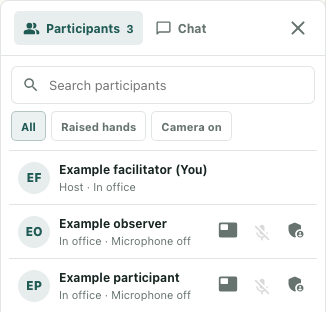
Where the formal meeting controls are available, open Participants. Confirm that the current conference host is handling the action; being a workspace owner does not by itself establish that role. Clear an unwanted search or roster filter before looking for the agreed person.
Identify the intended row carefully. The current host's Mute control is named for that participant and is disabled when the displayed microphone state is off. A displayed name alone does not confirm an available control connection. If the target or meeting context is uncertain, stop and clarify it rather than trying several rows.
Use the intended Mute control once when that is the agreed action. The button can remain enabled while the request is unresolved. Repeated clicks are not a reliable way to obtain confirmation, and a click alone does not change the returned participant state.
Check the result and what listeners hear
Read any conference action notice. Host access required, Participant not found or another failure needs attention before continuing. An error leaves the outcome uncertain; it does not establish that every part of the attempted action remained unchanged.
Inspect the returned microphone state separately. In the original interface's fictional local illustration, Example participant has a supplied Microphone off state and a disabled Mute control, while Example facilitator retains the host role. No real meeting, mute delivery or acoustic recovery was exercised for that illustration.
Speaking or Presenting can take precedence over microphone wording in a row. Whatever the label shows, ask listeners whether they can now follow the intended contribution. A microphone-off readout is not proof that the unwanted sound has stopped. If the route remains unusable, keep the work paused or use the agreed written alternative.
Let the participant return, then restart the question
The participant chooses when to use their own available microphone control again, or whether to continue through text. Do not promise to turn their microphone on remotely or assume a host mute is a permanent lock. Check the person's actual return and ask for a brief listening confirmation before continuing.
Restate the checkpoint: option B was the last understood point, and option C still needs comparison. Invite the interrupted contribution through the agreed route and confirm that the group can evaluate it. Record any unresolved audio problem separately from the resumed work.