Review an accidental map edit before resuming work
Pause the editing session and describe the change
If a shared map suddenly looks wrong, stop adding corrective edits until you understand the affected area. Record the intended action and the observed difference. For example, a reception desk may have moved across the main passage while someone was arranging a nearby cabinet. Capture the relevant surroundings without collecting unrelated participant or account information.
This is a change-review practice, not a claim that Kiguri automatically records every editor action in a teamwide audit log. Use evidence you actually have rather than reconstructing a history from memory and presenting it as certain.
Check whether the problem is local or shared
Ask an authorized teammate to compare the relevant area in their current view. Establish whether you are discussing an unsaved draft, a saved map, or a result whose save state is unknown. Record the uncertainty if it cannot yet be resolved.
Do not ask multiple people to try different restorations simultaneously. Name one recovery owner and ask others to hold further edits. A well-intentioned second repair can obscure the original problem or replace useful changes without anyone understanding the combined result.
Agree on what must be preserved
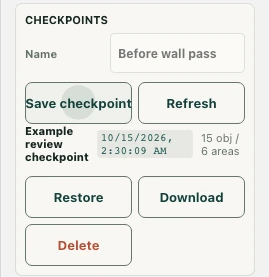
List the essential route or interaction that needs recovery and any legitimate changes made during the same session. Compare available checkpoints or exported copies before choosing a recovery path. An older copy may restore the reception area while losing a meeting layout that the team intended to keep.
The fastest restoration is not necessarily the smallest loss. If participants are waiting, a temporary move to another accessible meeting location may be safer than a hurried broad rollback. Let the recovery owner use the actual editor controls with appropriate permission; this guide does not replace the product's Undo or import instructions.
Verify the incident is closed
After recovery, repeat the original participant task and check a nearby area that should remain unchanged. Confirm the intended saved state using the available success information rather than relying only on a corrected picture. Document the final result and any unresolved limitation in the team's normal change record.
Then identify a practical prevention step: a clearer editing handoff, a named recovery point before a large change, or a smaller planned edit. Avoid blaming the last person visible in the office without evidence. Resume unrelated decoration only after the shared usability problem and the recovery state are understood.