Set a reception NPC name and check its opening greeting
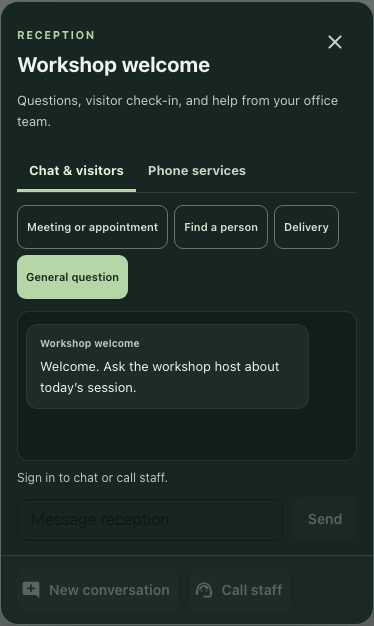
Give a reception NPC a recognizable name and short introduction, then check the exported text and opening conversation screen. Use an editor-added receptionist: the current save structure does not retain these changes for every base-map receptionist. The example image shows the actual dialog with synthetic wording in an isolated guest state.
Start with an editor-added receptionist
In a workspace you are permitted to edit, work with a receptionist added through the office editor. Receptionist under Functional objects starts its placement workflow. Distinguish that object from a decorative counter or a receptionist supplied by the base map.
Select the intended object and find Reception NPC. Its Name and Greeting fields are the controls for this task. Resolve an uncertain selection before editing. This workflow leaves avatar, visitor form, access settings, and workspace AI instructions outside its scope.
Write two short, nonempty literals
Use a recognizable name and one concise opening line. The synthetic example uses Workshop welcome and Welcome. Ask the workshop host about today’s session. The name identifies the reception point; the greeting explains its subject without promising a response time or completed service.
Keep Name within 48 characters and Greeting within 120, and inspect what remains after entry. The editor clips longer input. A long single-line field can scroll horizontally, so its visible end is not the whole stored sentence.
Use nonempty text. Whitespace-only names can retain the previous name. Clearing a greeting can look empty immediately while a reconstructed receptionist falls back to its default welcome. A blank field is therefore an unreliable reset instruction.
Inspect the exported object before saving
Use the available editor JSON export workflow and inspect the intended custom object in the resulting layout. Match its identifier and receptionist kind, then check receptionistName and message against your two field values. Keep them attached to that object rather than searching for a matching phrase elsewhere in the file.
Editor-added objects are recorded as custom objects, whose saved structure includes these text fields. Base-object transforms contain positions without these name and message values. Editing a built-in receptionist can therefore change the current display without establishing that its text will survive reconstruction.
If either field is missing or belongs to another object, stop and record the discrepancy. Do not assume another save repairs an omitted field or perform an unrelated edit as a workaround. Follow the ordinary Save changes workflow for the intended authorized layout, and confirm its actual outcome.
Check the initial reception display
For an ordinary permitted visit, inspect the receptionist’s opening conversation screen. The configured name should be the header and assistant label, and the greeting should be the initial message when no conversation messages are displayed and history is not loading.
Existing conversation history can take precedence over that greeting. Seeing an earlier thread is not enough to conclude the update failed. Check which conversation state you are inspecting, while keeping private history out of a demonstration or report.
The isolated example has no workspace, signed-in user, stored conversation, or visitor form. It shows the literal header and greeting with sending disabled. That verifies the native initial display, not an AI answer, staff availability, live map revisit, or server save.
Keep a bounded configuration record
Retain the object identifier, entered values, exported field check, and actual save or revisit findings you obtained. Mark anything untested. If the display differs, distinguish wrong-object selection, missing exported metadata, existing history, and unsaved changes before editing again.
The finish is one identified editor-added receptionist with inspectable text and a checked initial-display context. This map NPC introduction does not configure AI behavior or prove that reception can respond, check in a visitor, or transfer a conversation.