Turn a reception handoff into a follow-up draft
Identify the request and your intended action
A staff member needs to prepare a later follow-up for a reception request, while someone else may handle the immediate conversation. Open Inbox & desk and choose Inbox where those member tools are available. Read the request's title and body before choosing an action. An alert is information to inspect, rather than evidence that you already own the work.
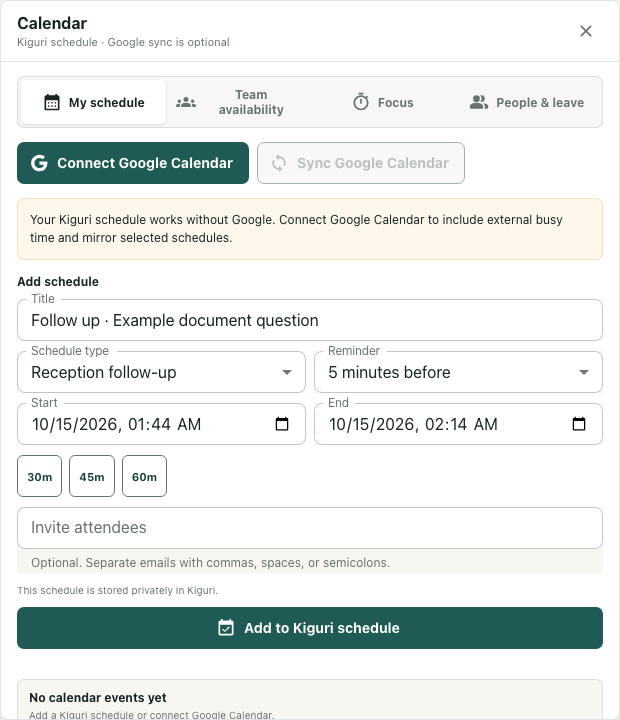
The worked example is fictional. Its reception card is titled Reception: Example document question, beside a separate example calendar alert. The interface screenshot uses an actual component with synthetic local data. No visitor information was fetched, request taken, schedule saved or invitation sent. This lets us inspect the complete planning bridge without manufacturing an operational result.
Choose planning separately from taking
Reception handoff cards offer Take request and Plan follow-up. Other alert types need not have those actions. Confirm that you are looking at the intended reception card rather than selecting a similarly named calendar reminder.
Take request is a separate request-handling action. It is not required to open the planning draft, and choosing Plan follow-up does not acknowledge or assign the handoff. If immediate ownership matters, resolve that through the actual request-handling workflow and its result instead of inferring it from a populated Calendar form.
In the fictional example, choose Plan follow-up because the bounded goal is preparing later work. Keep any current request status or responsible person unresolved unless you have independent evidence. Planning a future time should not silently replace an agreement about who is responding now.
Inspect what reaches Calendar
Plan follow-up stores a small local draft, closes Inbox and requests Calendar to open. It constructs the title by removing the leading Reception: label and adding Follow up ·. The example becomes Follow up · Example document question, with schedule type Reception follow-up.
Only title and type are transferred. The card's body, visitor contact details, ownership, intended date and attendee addresses are not copied by this bridge. The actual fixture shows an empty Invite attendees field. Read the resulting form rather than assuming the card supplied every piece of scheduling information.
Calendar consumes and removes the local draft when it mounts. This is a temporary handoff into the form, not a durable saved appointment. If Calendar does not open, the opening request alone cannot establish that the form appeared. A malformed local draft is ignored, so the normal planner may appear instead of the expected title.
Complete the review before a separate save
Check Title, Schedule type, Start, End and Reminder. The initial times and reminder come from Calendar's own form state; they are not a commitment extracted from the reception request. Add attendees only when appropriate, and inspect any connection or synchronization choice separately.
The unsent form can include informational wording about private Kiguri storage. That helper text is not a save receipt. Add to Kiguri schedule is a separate action, and external synchronization or invitation delivery requires its own result. Neither was executed in this example.
Finish with a reviewed draft and a clear note about what remains: request ownership, scheduling agreement and saving outcome. On a smaller screen, scroll the Calendar body to inspect lower fields. If Inbox failed to load, retain the error rather than treating an empty-looking list as proof that every request has been handled.